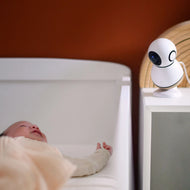
Video baby monitors help you check the nursery from a screen, but the connection and viewing setup matter as much as the picture. Compare phone-app monitoring with systems that also include a dedicated parent display, then check the network and power requirements for the rooms where you will use them.
Choosing a video baby monitor
Do I need Wi-Fi, or can I use a separate parent screen?
An app-based camera uses your compatible phone for viewing. A system with a dedicated display can keep the feed on a separate screen; check whether its local viewing mode works without Wi-Fi. App access away from home and a local parent-display link are different features. Match the required Wi-Fi band to your home network and check compatible phone operating systems before buying.
Does a rechargeable parent screen mean the camera is cordless?
No. Check how the camera and parent display are powered separately. A rechargeable parent screen does not establish that the camera is battery-powered. Plan the camera position around its own power requirements.
Do I need a subscription to view or record video?
Separate included live viewing from optional recording, cloud storage or other connected services. Check which features are included with the exact monitor and which require a trial, storage card or ongoing payment before choosing features you will rely on. Compare the camera's video specification with the parent display's screen resolution, too; they may differ.
Will the quoted range cover my whole home?
Use the manufacturer's range guidance for the exact viewing mode, and consider the rooms, walls and network conditions in your setup. A local-screen range is not the same as app access over the internet.